


News

04/06/2024
Getting Started with Creator Studio
Creator Studio launched on May 9, 2024, ServiceNow is excited to share a new application development experience designed as a new entry point for business users to truly leverage their process expertise to automate, simplify, and manage their own work.
Over the next few weeks, we’ll be posting weekly to provide an overview of what Creator Studio is, how to use it, how to integrate it into your existing development infrastructure, and how it can help make big differences in your organization in a short space of time.
What is Creator Studio?
ServiceNow’s Creator Studio is a breakthrough for non-developers, offering an easy-to-use, guided environment for building request-based applications. By breaking down traditional barriers, it empowers business process experts to turn their automation ideas into tangible solutions without the need for extensive coding knowledge.
While not intended to replace existing development tools like App Engine Studio, Creator Studio complements them by providing a new entry point for creating applications. This innovative approach represents a paradigm shift in the way we perceive application development on the ServiceNow platform, opening it up to a wider audience and enabling more users to contribute their process expertise to real applications.
Introduction to Creator Studio
When a user logs into the Creator Studio app, depending on their access level (full or limited), they will see all the apps they are entitled to and can request access to the ones they don’t have. If you have full access to Creator Studio, you can create a new app by clicking the “Create App” button in the top left corner.
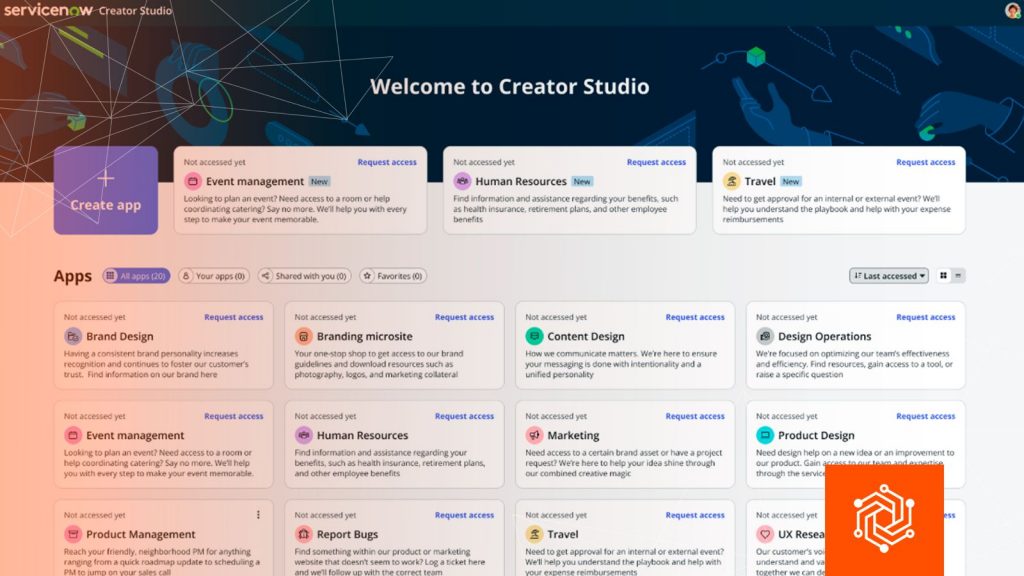
In future articles, we will discuss Creator Studio apps, their structure, similarities with other apps, and their differences. But for now, the main thing to remember is that each new Creator Studio app is created in its own Scope, which protects the integrity of that app’s data.
Each application in scope in Creator Studio can contain multiple forms, which is a great new way to develop applications, allowing individual departments to have many input forms, but keeping licensing, data management, and maintenance simple and efficient.
Building an App in Creator Studio
When building an app with Creator Studio, there are three main areas you will use to build your app: Form Authoring, Automation, and Workspace.
Form Creation
The form builder provides a set of configurable form components, allowing the user to change labels, provide explanatory text, add required field types, reference data, and simply build their catalog item as the first component of the application.
Automation with Playbook
Under the hood of Creator Studio Automations are Playbooks, one of the most powerful pieces of Creator Studio, enabling process owners to translate their process expertise into powerful automations with a simplified set of Process Automation Designer components. Users add triggers to determine when tasks are performed and can add and modify process steps using the visual diagram or Kanban view.
Workspace
Creator Studio’s unified workspace provides app makers with a single area where they can access their own filtered lists of submitted app requests. Each Creator Studio application resides within this same Creator Studio workspace, providing a convenient fulfillment experience without the overhead of creating and maintaining multiple workspaces. Because each app you create has its own automatically created agent role, when an individual logs into the Creator Studio workspace, they will only see the Creator Studio apps they have permission to access through that role.
Implantation
After building an input form, creating single-step automation, and configuring the workspace, the final step is to submit the application for deployment. Creator Studio natively integrates with App Engine Management Center and uses pipelines to deploy applications, providing a configurable method for deploying to instances. Using pipelines simplifies the governance process and eliminates the need for Creator Studio developers to worry about deployment configurations. When you build your Creator Studio app, you get your own app scope (and associated roles), which helps encapsulate all the components you develop into an easily deployable package. Pipeline deployments give administrators full control over which applications can be promoted to their production instances through the App Engine Management Center. Once approved by administrators, the application can then be used across the organization.
Creator Studio democratizes application development on the ServiceNow platform, enabling process experts to create automated solutions affordably and efficiently. With intuitive, integrated tools like the form builder, automation with Playbooks, and unified workspace, it makes it easy to create robust, custom applications that align with governance and deployment best practices.
BROWSE BY
CATEGORY
- Analytics & AI (25)
- Digital Transformation (21)
- General (3)
- Operations (12)


